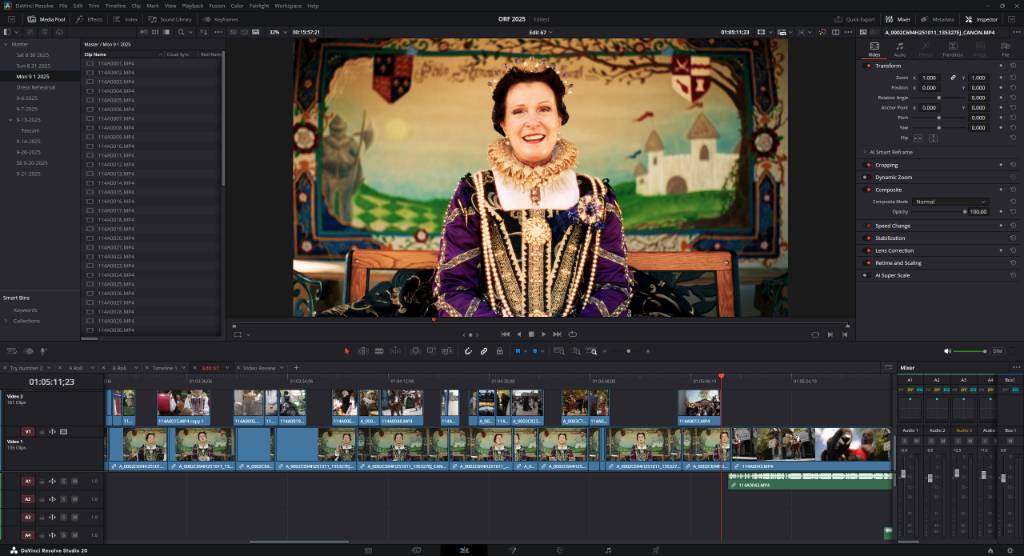
Since the creation of this guild, I've been seeking out ways to help create some engaging content that others might find interesting. As part of this, I've been working on putting together a series where I walk through a video that I edited and talk about some of my thought process and show how the assembled video looks on my timeline in Resolve. This is the second video in this series. I would recommend watching the full video over reading this post as much of what I talk about is very visual, but I will do my best to describe what I'm talking about.
Building An Introduction
Something that I have been really struggling with building better introduction to videos. For a lot of my older videos, the video will start with a simple montage that lasts for maybe a minute, then it will move to the next part of the video. While I think that there's nothing wrong with doing it like this, I feel like moving more towards the way I'm trying to do it now is more impactful and the key is that there is 'texture' in the introduction. Along with the music, you also hear people, actors shout things, musicians play music. You are trying to give people an introduction and build the world you are about to show not just visually but audibly as well. When I created my West Virginia 2025 video, this was the first time that I felt like I had started to make this kind of transition.
The introduction was the first thing that I edited together for this video. I wanted to edit something during the festival season and this is what I came up with. The majority of the rest of the video, I edited together in the month of December. I took a long time to finally put something together but my goal was to try and finish it before the start of the new year (2026). I think I made it with like 1 day to go. I'm glad I did edit the intro during the season because I thought grabbing a short clip of the cannon firing would really add a lot and it's not something you can normally easily film or take pictures of. I messaged Cheryl and asked if I could get special permission to get a sweet shot of the cannon and thankfully she agreed! So big shoutout to her for help with that.
Condensing The Video
This year, I ended up with about 56 hours of footage that I recorded over the season. Now, this number is a little inflated. There are gaps of time between each day in my timeline and I recorded a ton of 3D footage this year, but all that to say - there's a lot of footage. I would love for the video to be 12 hours long and include literally everything. The problem is - that is crazy unrealistic. Everything has a cost, whether it's your time, or your money, or both, and I don't want to create long videos - I want to create engaging videos. There comes a point where you just have to decide what you want to cut for the good of making a more engaging video.
There are a lot of interviews that I included in my final video this year, but it wasn't all of the interviews that I recorded. For every minute of the video that you watched, it took at minimum 2 hours to edit, so if I wanted to add an additional interview that was only, say 1.5 minutes long, that was 4 extra hours of work. That doesn't include the time that it takes to go back and watch the video as a whole start to finish again and again to try and spot places where the video slows down or there's an um that I want to cut or so on.
Capturing Interviews
I've started to develop a process for filming and editing interviews. When I first started, I would record interviews with my 85mm lens and I discovered that while the image looks great, it's very hard to hear them because of how far away they are. I've found that using a 35mm lens does a great job at meeting in the middle, where you still feel like you get a good amount of background separation but still also get good audio as well. I used two different microphones to record the interviews the audio this year - a RODE VideoMic Pro and a Sennheiser MKE 600. I've start to transition away from the RODE and towards the Sennheiser because I prefer the EQ of the Sennheiser. I feel like there are small edge cases where the captured audio just doesn't sound right on the RODE and the only way I was able to fix it was using the Sennheiser instead. It's a lot more inconvenient to use but I think it's worth it in the long run for the audio.
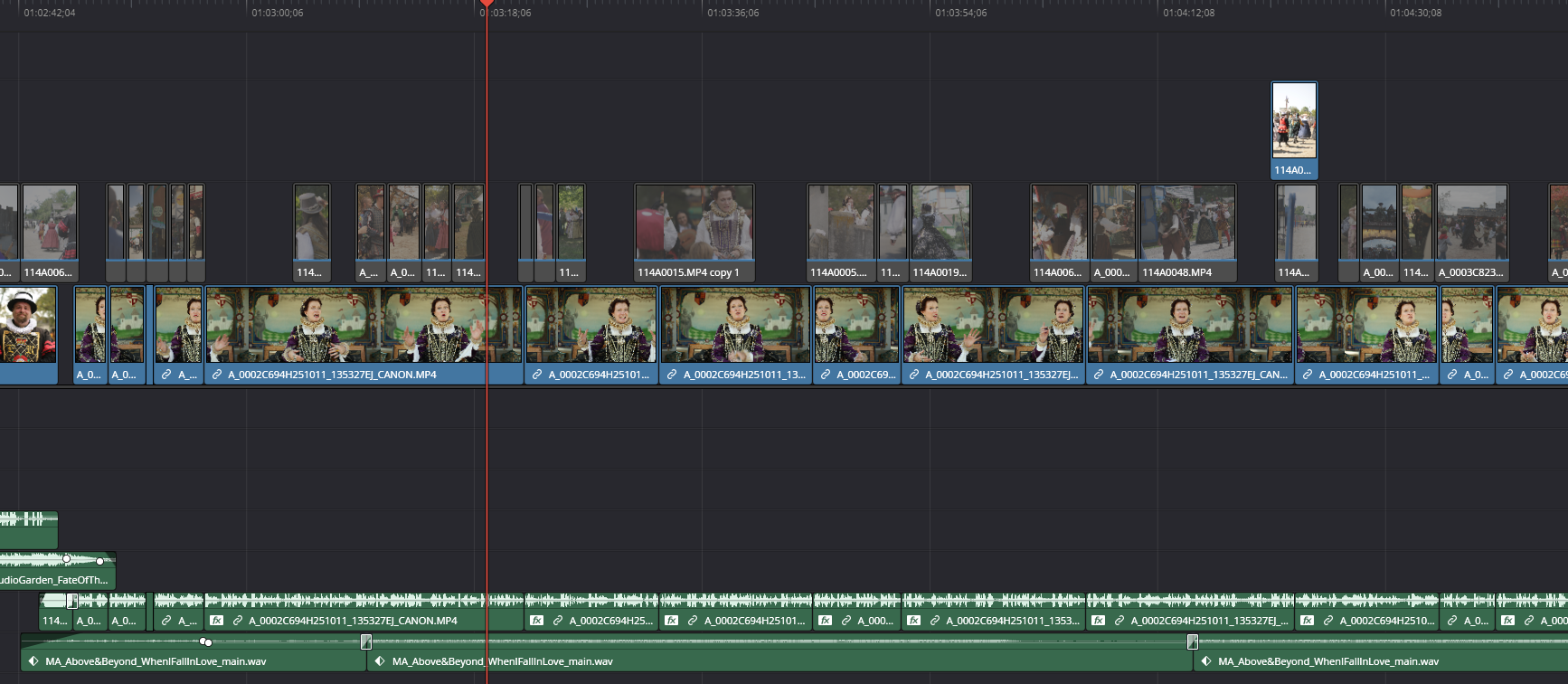
When I edit together an interview, I normally try to have an intro transition clip that is about 15 to 45 seconds long to try and introduce the person that is about to start talking. Then I will put them talking down on the timeline and cut it down to how I want it to sound. So that might include things like cutting out dead air or asking questions or issues with the audio. I will then go back and try and cover up all of the cuts with B-Roll that seems to make sense. After that, I will then add additional B-Roll to make the interview feel more organic. Then, depending on what is going to happen next, there might be an outro featuring them or it might just transition to the next section.
Applying The Color Grade
Over the past few months, I've been doing a lot of changes to how I color grade my clips. I still don't think I'm entirely happy with the color grade process as it stands and will most likely still make lots of changes. One of the big issues is that it's very easy for the footage to turn pink or red in places. I usually record Rec. 709 in camera, then in post I will apply a two step grade - a simple grade where I crush the blacks, increase the shadows, and boost the colors slightly, and then a second step where I add the film look creator effect onto the image. I feel like the doesn't really jump out at you from step 1 to 2 but I think it definitely makes an impact in the long run, where it makes a lot of the colors have a more "pastel" coloring to them.
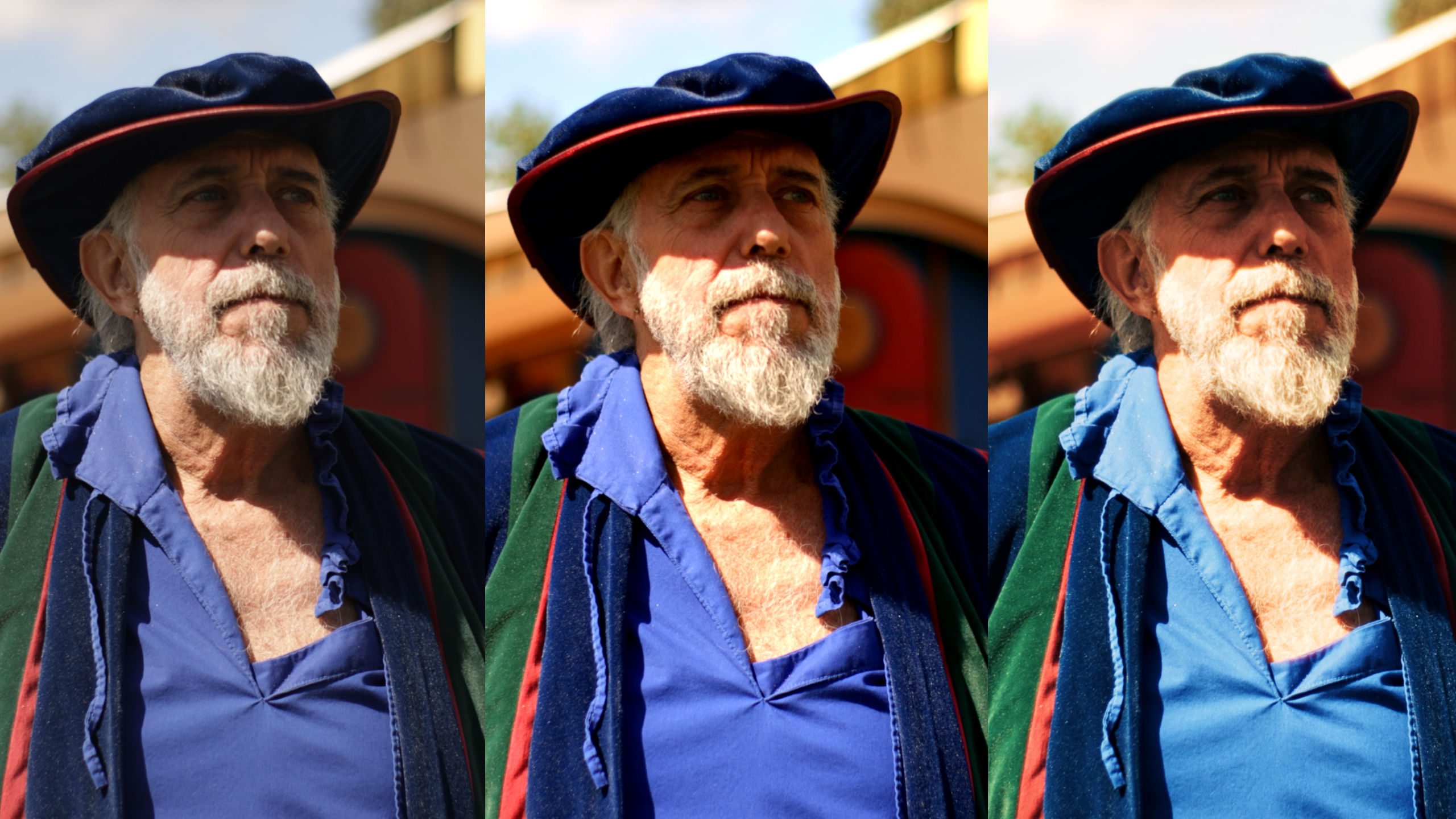
The other problem with the film look creator grade is that it adds a ton of render time to the video. Without it, rendering is super fast but once I add it, it can easily take 1 minute of render time per 1 minute of footage. Granted, that's still fast by many standards but I like efficiency.
Wrapping Things Up
Overall, I am happy with how the video turned out with what is in the video. Going back and watching the ORF 2024 I made, I definitely feel like I've made a lot of positive improvements, but I also feel like there's something missing that's in the old video that's not in this one. There are moments in the old video where things just kind of slow down and you get time to just watch and enjoy the environment around you. My new video is very engaging but I feel like there's never really a moment to stop and just take it all in. It's something I would like to try and improve in the future. Something else I would like to try and work on is add more "narrative" content where instead of just interviews there's written or improved scenes that make the video feel more alive.
I look forward to seeing what will come next. It will most likely be a video about the St. Petersburg Renaissance Festival. I'm excited to see how things turn out!